When I get a new mac the first things I do is run:
## Chosing where I want to store my screenshots
SCREENSHOTS_FOLDER_PATH="$HOME/Screenshots"
SCREENSHOTS_URL_STRING="file://${SCREENSHOTS_FOLDER_PATH}"

## Creating the folder
mkdir $SCREENSHOTS_FOLDER_PATH


## Telling MacOS to store my screenshots here
defaults write com.apple.screencapture location $SCREENSHOTS_FOLDER_PATH; killall SystemUIServer
so all my my screenshots don’t clutter my desktop (which usually has some busy image of a big city; Currently it’s this great picture of NYC).
The problem is that this folder gets full way too quickly. It’s things I want to remember, tweets that made me laugh, error logs from my console, diagrams/graphs from talks over zoom, etc. Over time it gets huge, and while I always say “I’ll organize it later and get rid of the the garbage later”, although later never comes.

At the time of writing there’s 834 PNGs in the folder (Nov 13, 2025 - April 2, 2026). If I spent 3 seconds per image (lower bound), I could have this done in an hour; That never happens though and I’d mull over questions like “why did I take this photo?” or “Was it the only one like this?”, which would add to that time. While I do want to go through these pictures, constantly context switching between what is in the images is not something I repeatedly want to do.
Wouldn’t it be nice if….
I want to organize my screenshots folder. LLMs have totally subsumed areas of computer vision (semantic understanding, character recognition, etc.) and would be great to have one tool for understanding a photo and what I might want to do with it later. I use Google Gemini a lot but I can’t drop every image in (would take forever), an API might be too expensive (PhD stipend), and the contents might be sensitive (tax information, API keys, etc.). I’m pretty excited about local LLMs so this would be a good time to try that out.
Actually building the tool
This became a series of trial and error of using local LLMs (something that isn’t great now but IMO has a lot of potential). MLX is Apple’s way of doing machine learning on their machines and can take advantage of the neural engine (a chip that runs the models a bit faster), so I wanted to start there.
I started with mlx-lm to get familiar with working with the open source MLX models that exist on hugging face and running them on my device. I did not realize initially but, mlx-lm only does text inputs and hallucinates if you try to add image inputs, so I switched over to mlx-vlm. I had one quirk with an “Unrecognized image processor” but a github issue pointed out that, after downloading it, I just need to delete one line in the model’s config file.
I was most familiar with the Qwen family of models (from Alibaba) and opted to use one of those. I’m using a Late 2025 MacBook Pro with an 16GB M5 (MDE04LL/A model). I wanted to have something that could just run in the background or overnight, so my first choice (“mlx-community/Qwen3.5-27B-4bit”) was way too big and (“mlx-community/Qwen2-VL-2B-Instruct-4bit”) didn’t have great outputs, but (“mlx-community/Qwen3-VL-4B-Instruct-4bit”) was just right.
I gave it the following prompt:
"Describe this image. Generate 5 generate keywords for this file based on the content in its image. Each keyword should be one word (no spaces or compound words), only use letters A-Z (no special characters or numbers), and use general everyday words that don't go beyond a 8th grade reading level. The goal is to have keywords that overlap with other images in the future, but have the keywords here be distinct enough to separate out the images later. Format the output as KEYWORDS: [keyword1, keyword2, keyword3]"
and parsed the outputs with regular expressions ("[ ][a-zA-Z0-9_]*[,| $ |$]") to clean up the keywords I got back. I stored the keywords in a pandas dataframe and output that just so I could audit the image tags it was generating.
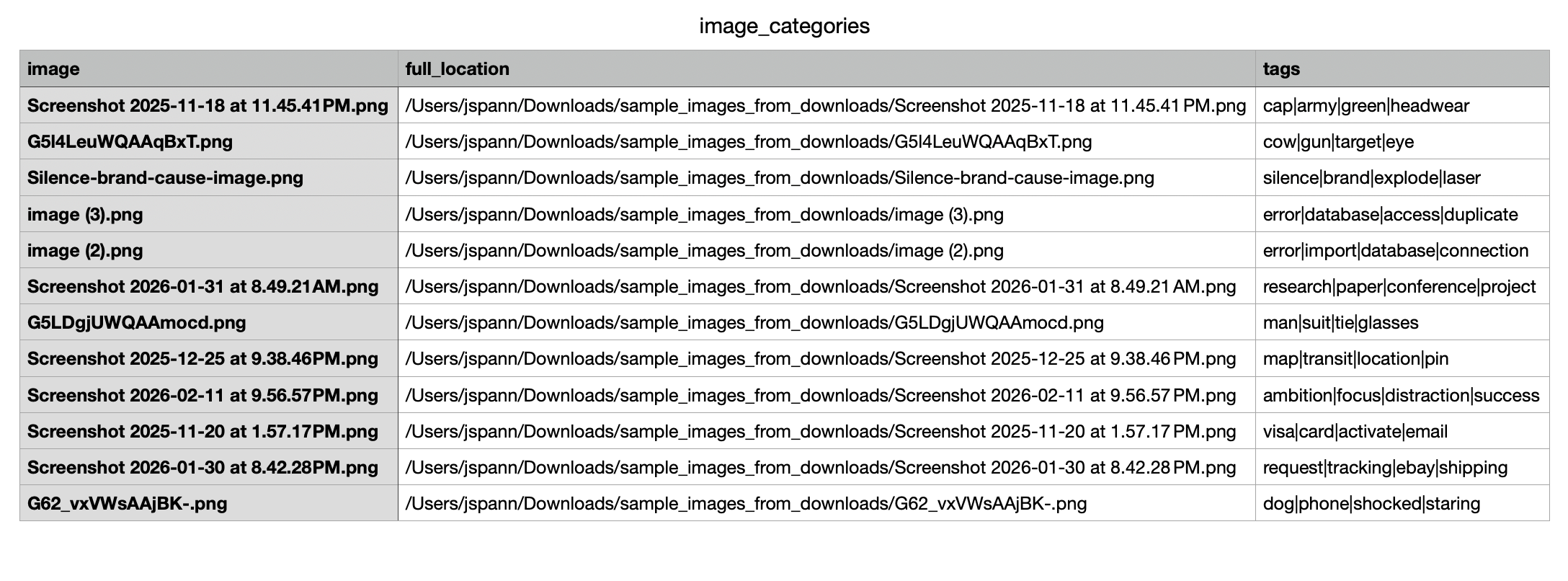
Next I gave the VLM the tags from the images and had it compile 5 overall themes for them based on its role as an “expert organizer”. With those, I had the script create a directory for each theme and map (again with the VLM) each image, based on its tags, to one of the 5 themes and move the folder to the directory.
Hey it works!
A quick uv run organizefiles.py gave me a proof of concept with a test folder of 12 images and took 4 minutes. Not lighting fast, but works and can be improved later!
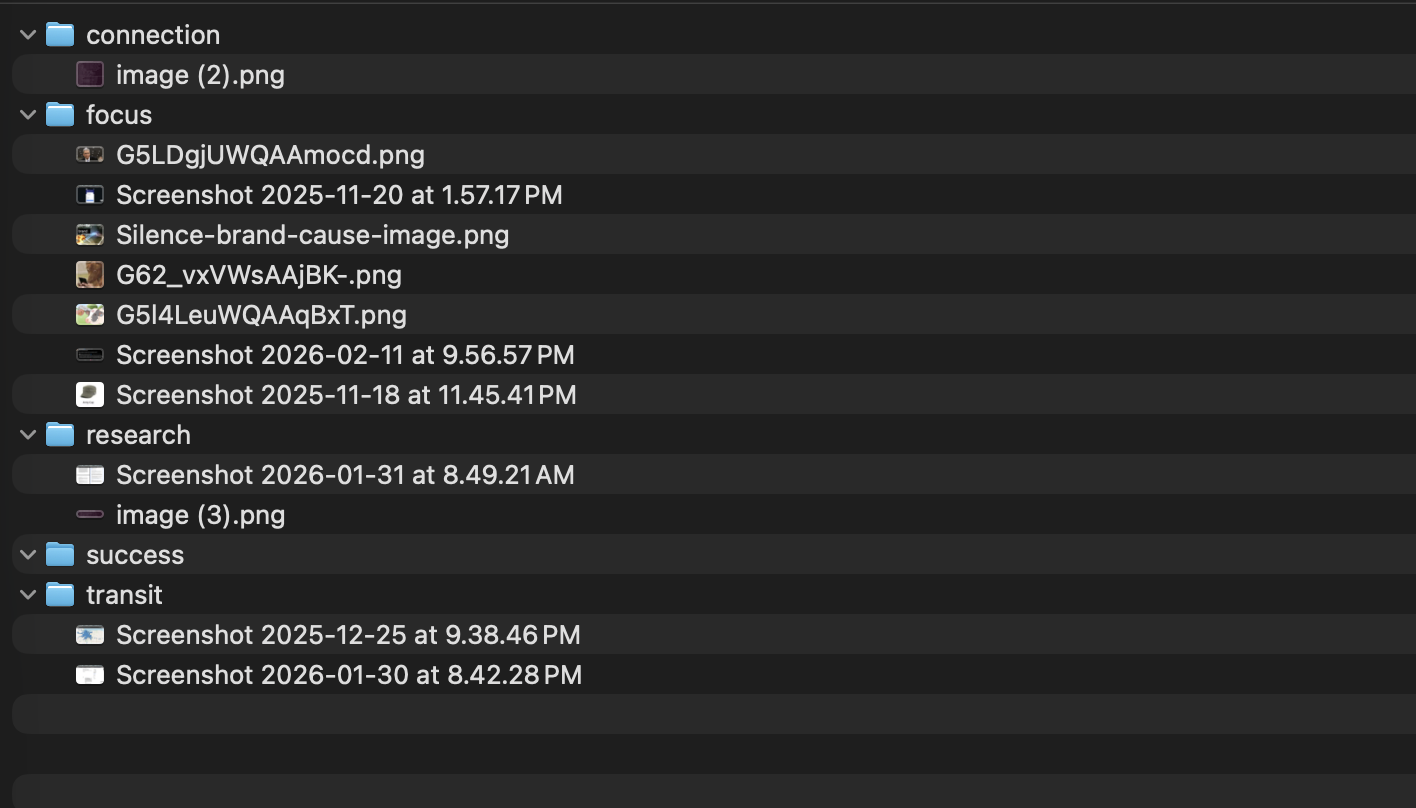
I’ll update this section of the post once I’ve run it on my full screenshots folder.
The end
It was fun to build this by hand and make something I wanted to use! There’s a few things I’d love to try (using word embeddings like word2vec to create directory names that are semantically close to the image tags, batching the images to make the search faster, grouping images by my potential intended use of the image) but for now, I’ve got a good starting place! The final script can be found here.
Overall, I really want local and on-device models to succeed. I think the use cases for LLMs/VLMs expands when a person knows that their data isn’t retained by an unauditable 3rd party and, or the content verifiably remains private. I hope to have more local tools like this for every day use in the future!
No LLM was used in writing or preparation of this post.